
Every time you use ChatGPT, Claude, or Gemini — whether in a chat window or through an API — the AI is counting tokens. If you pay for API access or run your own AI agents, those tokens translate directly into your bill.
What is an AI token?
An AI token is the smallest unit of text that a language model processes. Providers like OpenAI, Anthropic, and Google don't read words — they read tokens.
Tokenization splits text into pieces based on frequency patterns in training data. Common short words like "the" or "and" are often one token. Longer or less common words get split into multiple tokens. "Anthropic" might be two tokens: "Anthrop" and "ic." Punctuation and spaces count too.
A rough rule of thumb: 1 token ≈ 4 characters ≈ 0.75 words. One thousand words is approximately 1,333 tokens. A standard ChatGPT conversation of ten exchanges might consume 500–2,000 tokens depending on response length.
Models also have a context window — the maximum number of tokens they can process in one request. GPT-4o supports 128,000 tokens; Claude Sonnet 4 supports up to 200,000. Larger context windows let models handle longer documents, but filling them fully multiplies your costs.
What does "tokens in LLM" mean practically?
Every LLM API call has two components billed separately:
- Input tokens — your prompt, system instructions, conversation history, and any documents you pass in
- Output tokens — the model's response
Output tokens are always priced higher than input tokens because generating text is more compute-intensive than reading it. Claude Sonnet 4, for example, costs $3.00 per million input tokens and $15.00 per million output tokens — a 5:1 ratio.
When AI agents run autonomously, token counts multiply fast. An agent that makes 50 API calls per hour, each with a 2,000-token prompt and a 500-token response, consumes 125,000 tokens per hour. At GPT-4o pricing, that's $0.31/hour — roughly $224/month for a single always-on agent.
What is tokens per second?
Tokens per second (TPS) measures how fast a model generates output. Higher TPS means faster responses — important for interactive applications but irrelevant for batch jobs.
- Gemini 2.5 Flash produces approximately 300–400 tokens per second
- Claude Sonnet 4 runs at around 100–150 tokens per second
- GPT-4o varies between 60–100 tokens per second depending on load
For non-interactive agents doing background analysis, TPS matters less than cost per token. For real-time user-facing features, TPS directly affects the perceived responsiveness of your product.
How much do AI tokens cost in 2026?
Prices have dropped roughly 80% since 2024, but the range is still enormous:
| Model | Input (per 1M tokens) | Output (per 1M tokens) | Best for |
|---|---|---|---|
| Gemini 2.5 Flash Lite | $0.10 | $0.40 | Maximum cost efficiency, high-volume |
| DeepSeek: DeepSeek V3.2 | $0.26 | $0.80 | Budget reasoning tasks |
| Gemini 2.5 Flash | $0.30 | $2.50 | Fast, cost-conscious production use |
| GPT-4o | $2.50 | $10.00 | Balanced production use |
| Claude Opus 4.7 | $5.00 | $25.00 | Highest capability |
| Claude Opus 4.8 | $5.00 | $25.00 | Latest Opus, highest capability |
| GPT-5.5 | $5.00 | $30.00 | OpenAI frontier, complex professional workloads |
| GPT-5.4 Pro | $30.00 | $180.00 | Max reasoning, high stakes |
Pricing via OpenRouter. Rates update automatically.
A critical detail: output tokens cost 4–6x more than input tokens across all major providers. Long, verbose agent responses are a primary driver of unexpected bills. Shorter, more targeted output instructions reduce spend significantly.
Matching task complexity to the right model tier is one of the highest-leverage cost moves available. Using a cheap LLM API like Gemini 2.5 Flash Lite ($0.10/M input) or DeepSeek V3.2 ($0.25/M input) for classification, formatting, or summarization — and reserving frontier models for tasks that actually require deep reasoning — can cut costs 80–90% on those workloads without quality loss.
Which tools help you monitor AI token usage?
If you use AI APIs at any scale, you need a way to see what's being consumed and what it costs — before the invoice arrives. The market breaks into two categories: developer observability platforms (designed for engineers who want trace-level data) and agent monitoring tools (designed for users who want readable cost intelligence without instrumentation). The seven tools covered here — AgentGuard360, Braintrust, Helicone, Langfuse, LangWatch, Arize Phoenix, and LangSmith — span both categories and cover most use cases from solo developer to enterprise ML team.
AgentGuard360
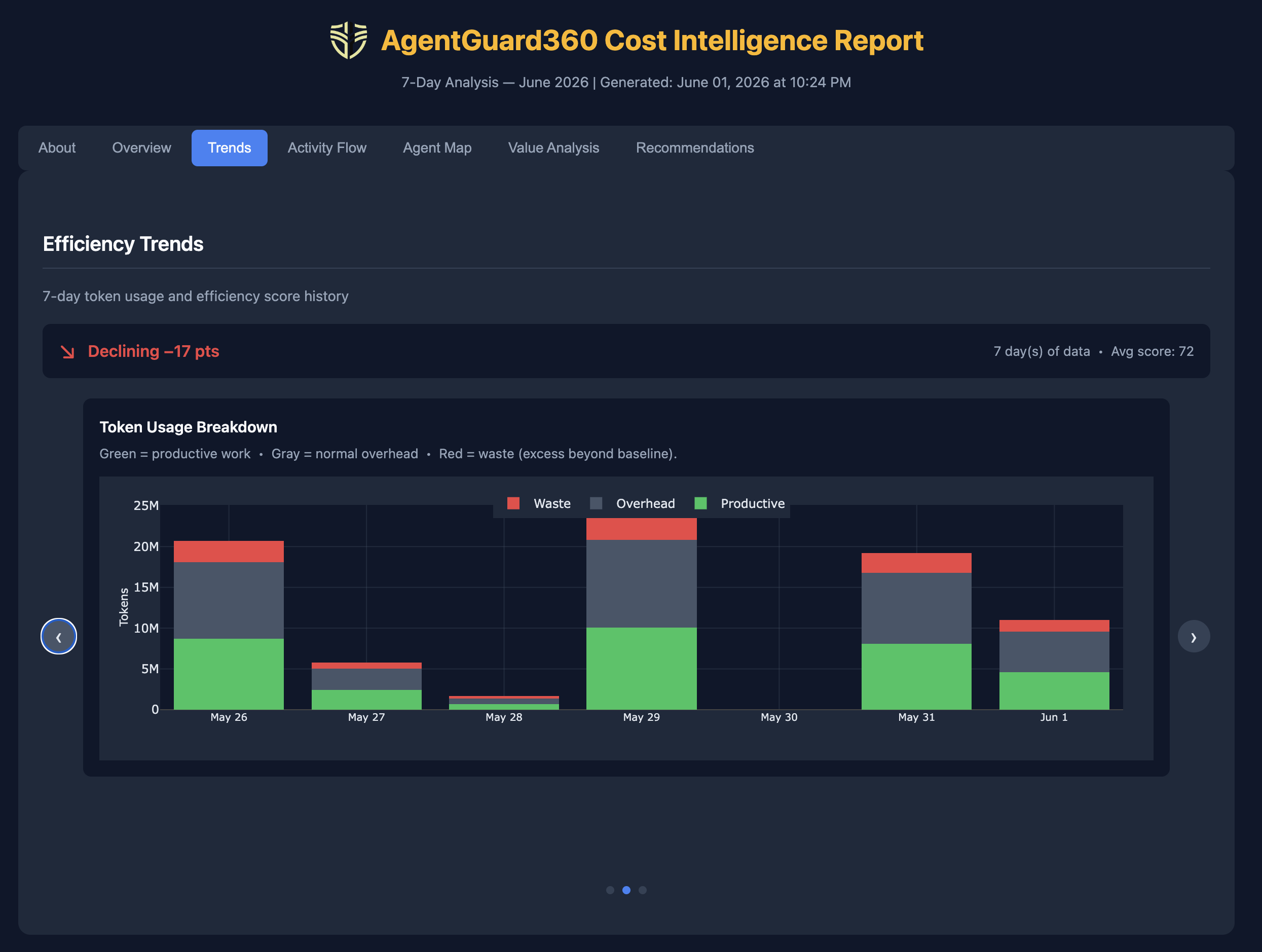
AgentGuard360 is an agent monitoring tool built specifically for non-technical users and small teams who want cost intelligence without instrumentation. It tracks tokens through a local proxy that sits between your AI agents and the provider API. A key differentiator is its Proxy Tool Interface — a specialized MCP-like interface that lets AI agents (such as Claude Code) run the platform directly on behalf of users, surfacing cost intelligence, security alerts, and efficiency reports without the user ever touching a command line.
Unlike developer observability platforms, AgentGuard360 doesn't require an SDK or a trace ID to get results. The same proxy that enables agent monitoring also delivers traditional LLM cost tracking — token usage broken down by activity and by model — so teams get both granular cost visibility and efficiency intelligence from a single integration point. Cost intelligence is driven by machine learning analysis of anonymized agent telemetry. Agents are automatically classified into archetypes — code agent, research agent, writing agent, and others — and efficiency grades are calibrated against community baselines for that archetype, built from anonymized usage patterns across the platform. This means your efficiency score reflects how your agents perform relative to peers doing the same type of work, not a generic threshold. It runs as a background service and generates a shareable HTML report with an efficiency grade (A–F), waste breakdown by driver (prompt overhead, loop/retry, model selection), and auto-suggested cheaper model alternatives. Subscription billing awareness is unique to AgentGuard360 — it calculates whether your token spend justifies the model tier you're paying for.
Best for: Non-technical operators, small teams running Claude Code or other AI agents, anyone who wants a readable cost report rather than trace data.
Helicone
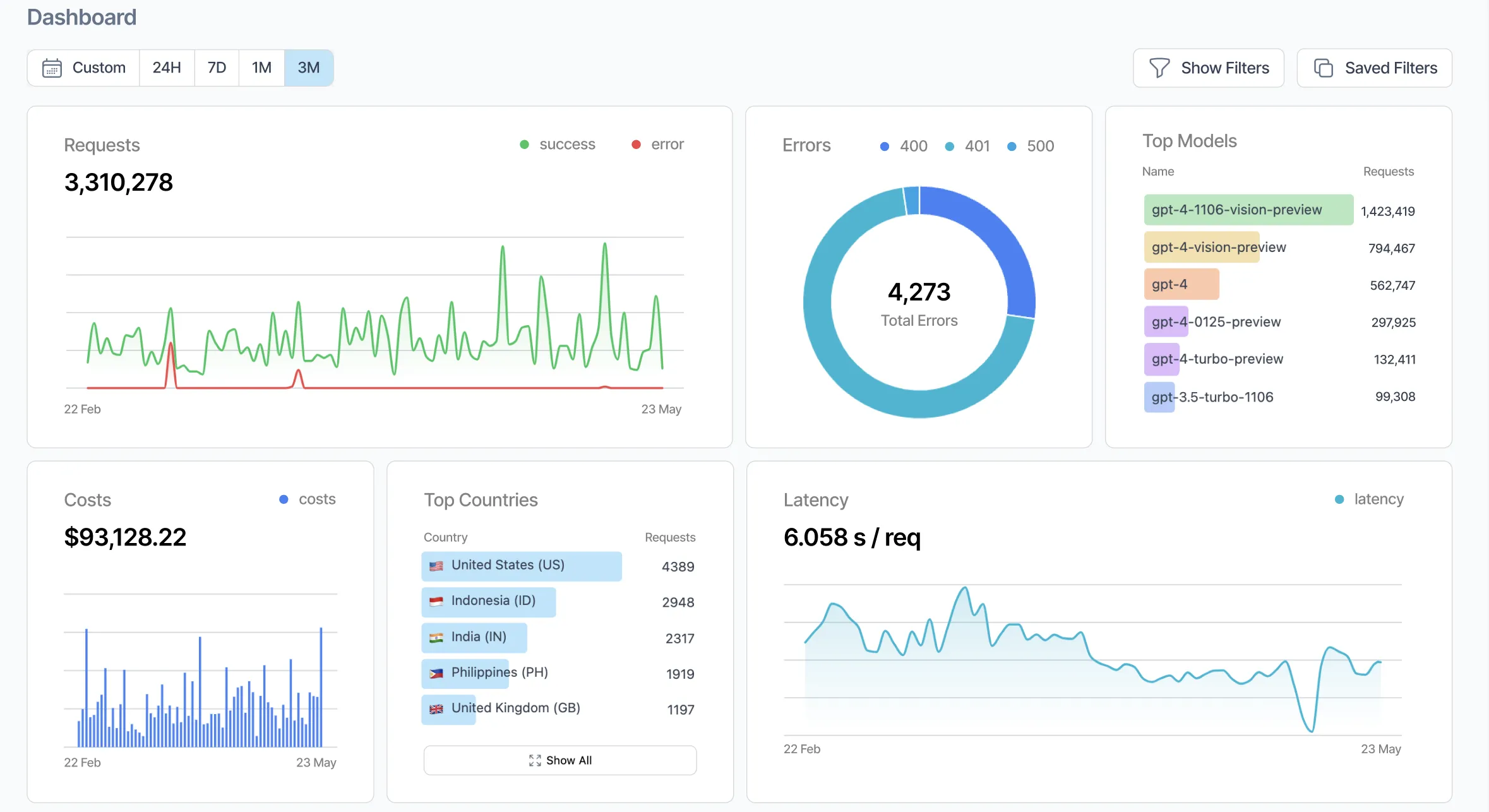
Helicone is a drop-in proxy layer for OpenAI and Anthropic APIs. You swap your base URL from api.openai.com to oai.helicone.ai (or the equivalent), and every API call passes through Helicone's infrastructure, which logs cost per request, per user, per model, and per time period — no SDK changes required beyond the URL swap.
The free tier covers 10,000 requests per month. Paid plans start at $79/month. Because it operates at the HTTP proxy level, it works with any language or framework without modification to your application logic. The tradeoff is that it adds a network hop and sends your prompts and responses through Helicone's cloud infrastructure — a consideration for privacy-sensitive workloads.
Best for: Teams that want fast, no-instrumentation cost visibility and are already using OpenAI or Anthropic APIs directly.
Langfuse
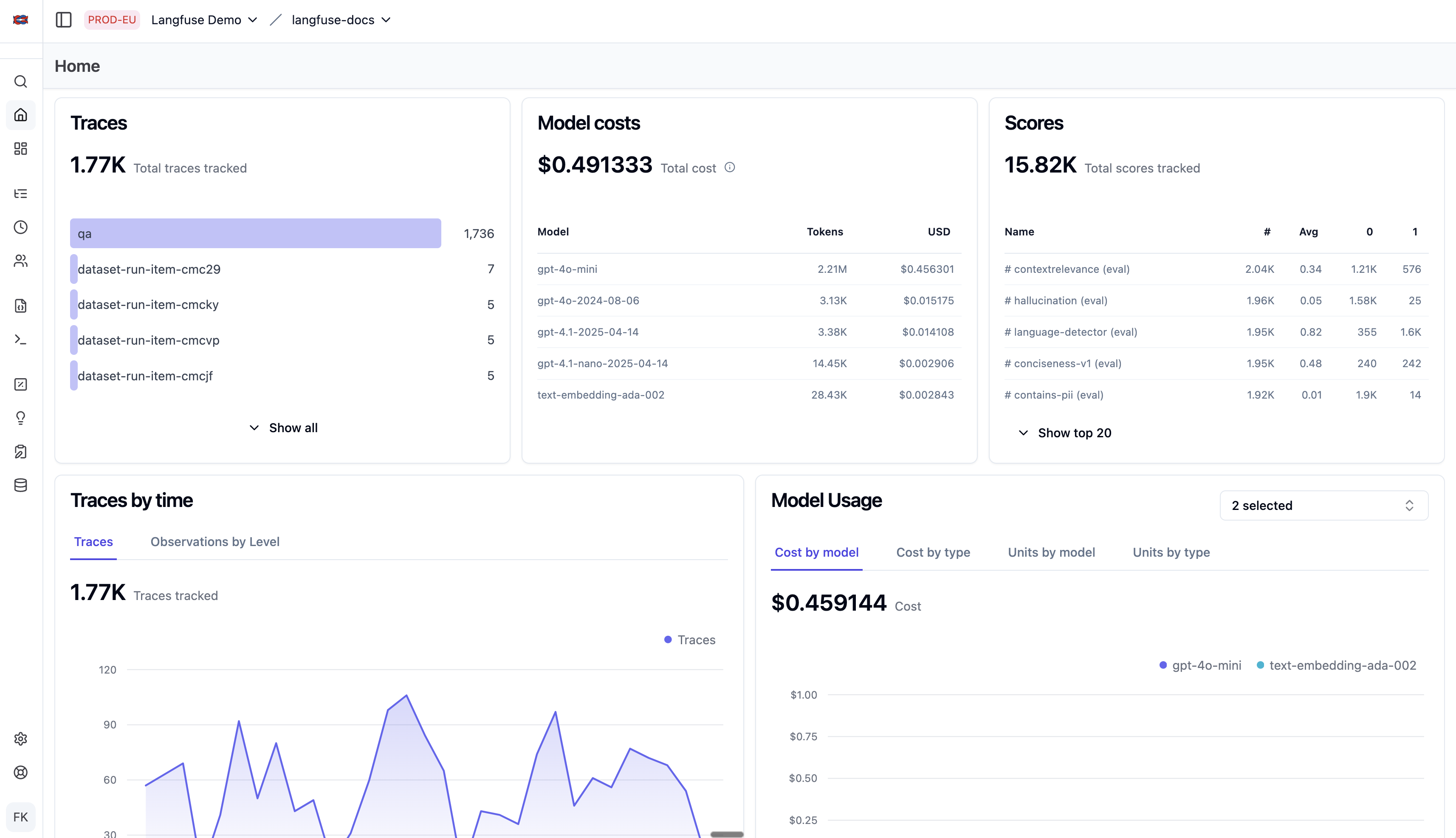
Langfuse is an open-source LLM observability platform with span-level token tracking across OpenAI, Anthropic, and Google models natively, with custom model definitions available for any other provider. It offers two deployment options: fully self-hosted (MIT licensed core, free) or Langfuse Cloud starting at $29/month for the Core tier. Token data is captured at the span level — each step in an agent workflow is logged separately, giving engineers granular visibility into which function calls or chain steps are consuming the most tokens.
Setup requires adding the Langfuse SDK to your application code (Python or JavaScript) or using OpenTelemetry integration. It supports LangChain, LlamaIndex, and direct API usage. Data sovereignty is a key selling point: self-hosted deployments keep all trace data on your own infrastructure, which matters for regulated industries. Note that enterprise features (SSO, RBAC, audit logs) are in a separately licensed ee module.
Best for: Engineering teams who need trace-level observability, multi-framework support, or control over where token data is stored.
Arize Phoenix
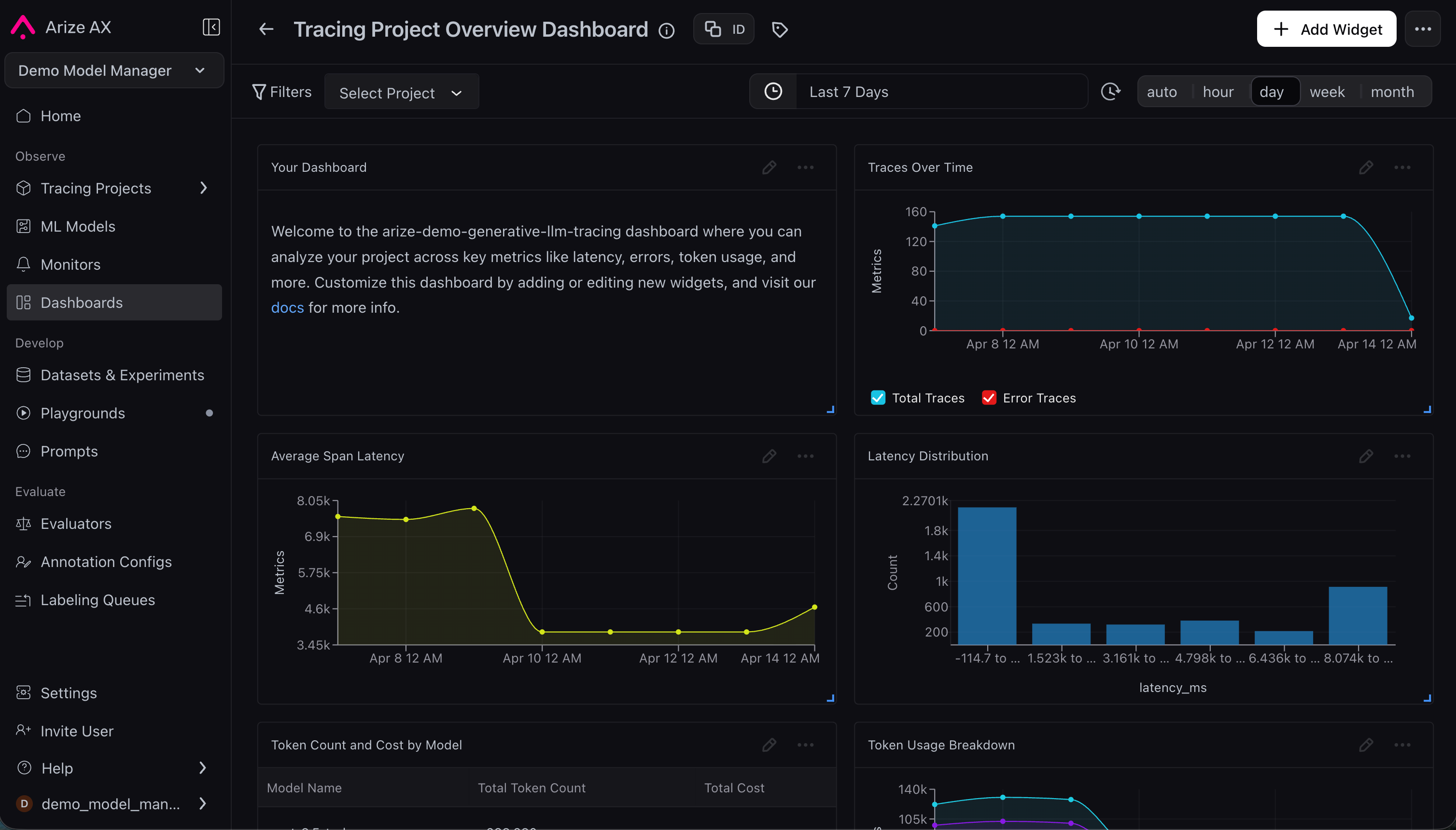
Arize Phoenix is an open-source AI observability platform built by Arize AI — a company with roots in enterprise ML monitoring — focused on tracing, evaluation, and debugging for LLM applications and agents. It captures every step of an agent workflow: prompts, tool calls, retrievals, and outputs via native OpenTelemetry support, making it vendor-agnostic across model providers and frameworks.
Setup is straightforward — Phoenix runs locally in under a minute, or via Docker, Kubernetes, or Arize's cloud hosting. The self-hosted version (Elastic License 2.0) is free with no span limits beyond what your own infrastructure handles. Arize's separate managed cloud platform (AX) has a free tier and a Pro plan at $50/month, though that's a distinct product from Phoenix itself. The primary differentiator is eval-driven development: Phoenix automatically evaluates prompts and agent actions at scale using LLM-as-judge scoring, so engineers can measure quality and cost together across experiments rather than just observing raw token counts.
Best for: Engineering teams who want to trace, evaluate, and improve agent behavior — particularly those running experiments or iterating on prompts at scale.
LangSmith
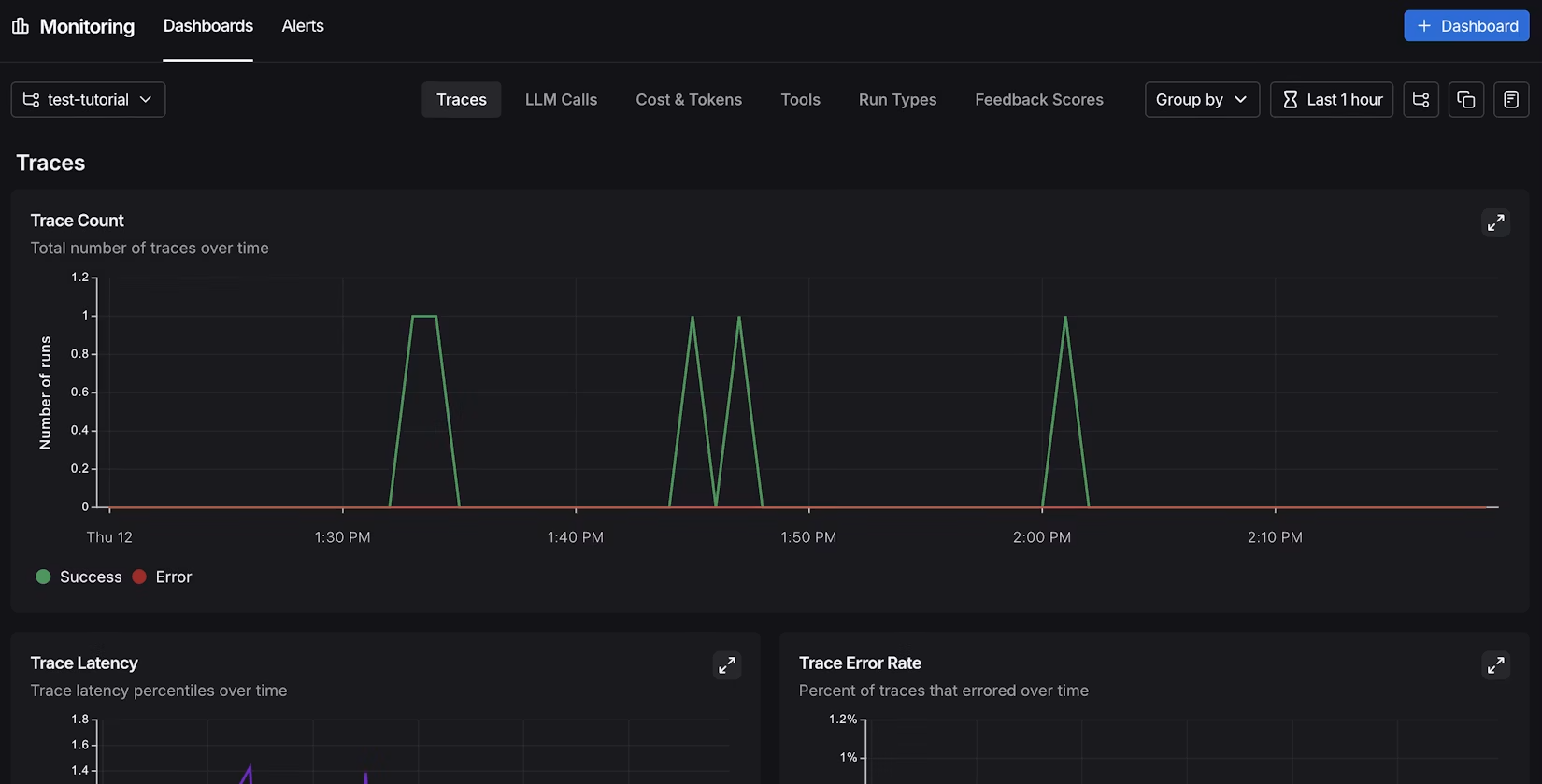
LangSmith is LangChain's observability and testing platform, but it works with any LLM framework — not just LangChain and LangGraph. Direct integrations include the OpenAI SDK, Anthropic SDK, Vercel AI SDK, LlamaIndex, and OpenTelemetry, with SDKs available for Python, TypeScript, Go, and Java. For LangChain users, setup is near-zero (two environment variables); for other frameworks, integration is straightforward via the SDK or OTel.
Cost reporting appears alongside traces and evaluation results, so token spend is visible in the same view as test outcomes and chain execution steps. LangSmith has a free tier; paid plans start at $39/month. The interface is trace-centric, which suits engineers but is harder to interpret for non-technical users looking for a cost summary rather than execution data.
Best for: Engineering teams across frameworks who want cost and quality visibility in a unified trace view, with particularly seamless integration for LangChain and LangGraph users.
Braintrust
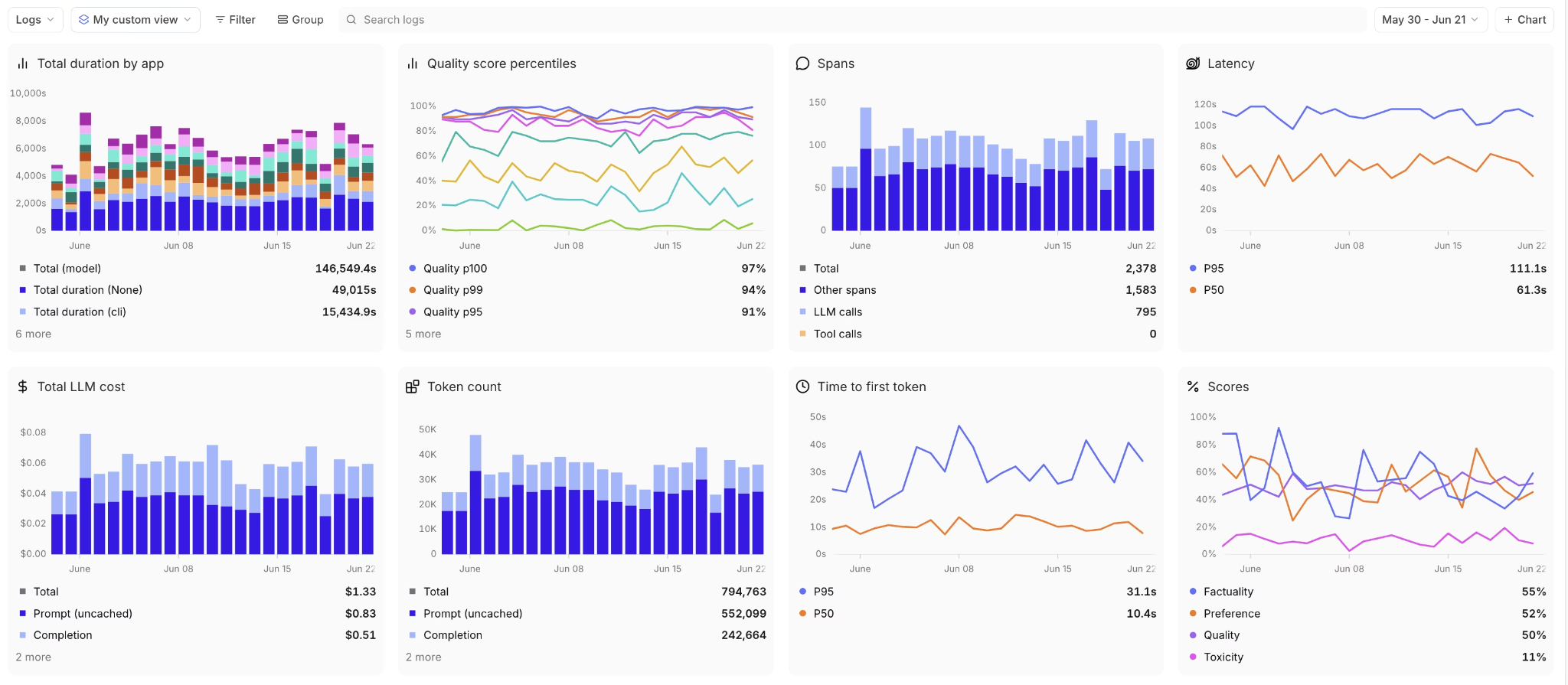
Braintrust is a developer platform for building AI products that combines LLM evaluation, prompt management, and cost tracking in a single interface. It has emerged as one of the most-cited observability tools in the developer community, particularly among teams iterating rapidly on prompts and models.
Cost tracking in Braintrust is trace-native — every experiment, prompt test, and production call captures token counts and cost automatically, without separate instrumentation for monitoring versus eval. The free Starter tier includes tracing, evals, and cost dashboards with $10 in included monthly credits, a 1 GB data cap, 10,000 LLM-as-judge scores, and 14-day data retention. The Pro plan is $249/month with a hybrid pricing model: a flat fee plus overage charges as usage scales.
Braintrust works with any model provider via its API gateway (a proxy-style integration supporting OpenAI, Anthropic, Google, AWS Bedrock, Azure, Mistral, and more) and supports open-source models out of the box. The prompt playground allows direct cost comparison across model variants — useful for choosing the cheaper LLM API for a specific use case before committing to production.
Best for: Teams who need eval and cost tracking unified in one platform, particularly those doing frequent model comparisons or A/B testing prompts.
LangWatch
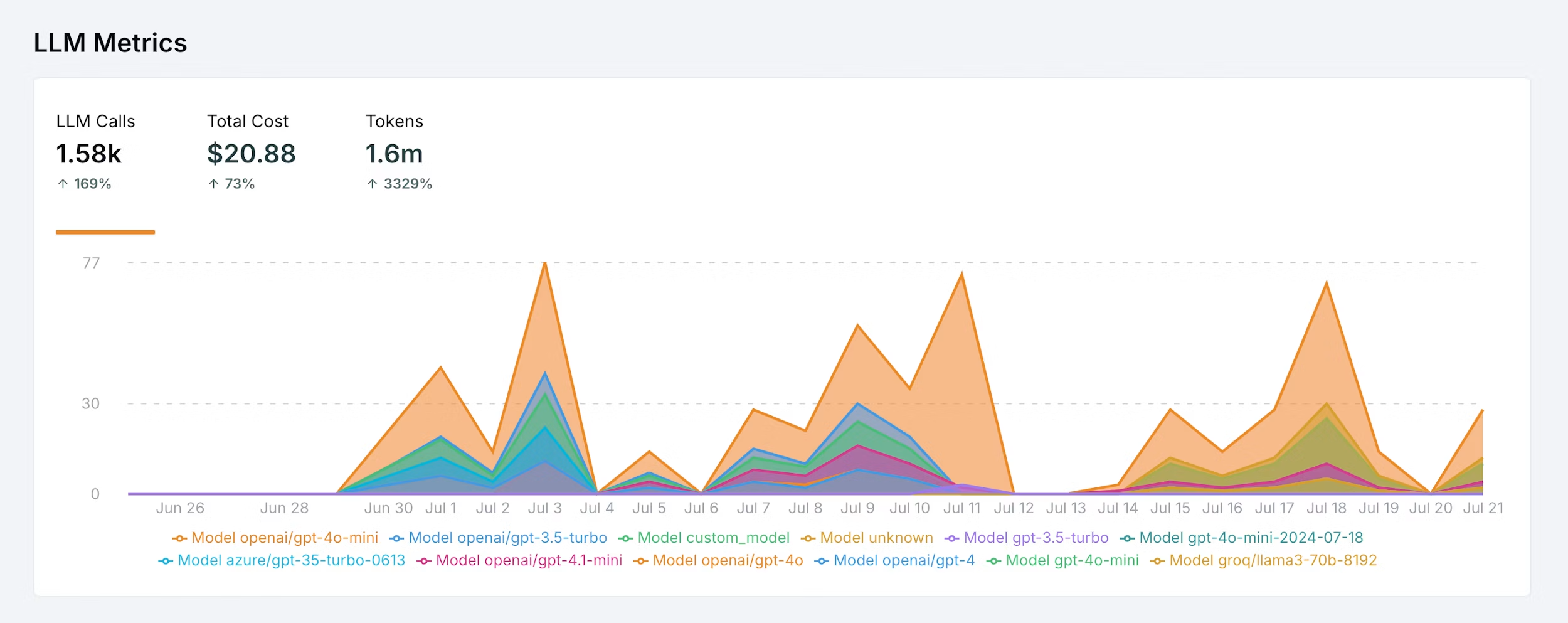
LangWatch is an open-source LLM monitoring platform focused on cost, quality, and safety — the three dimensions it tracks in parallel. Setup uses a lightweight Python SDK: a decorator or context manager wraps your LLM calls, and data flows to LangWatch's dashboard without requiring proxy routing or URL changes.
Cost tracking is at the individual call level, with aggregation by user, thread, and time window. LangWatch adds quality evaluation on top of cost data — it runs guardrails and LLM-as-judge scoring on your production traces, so you can see whether cheaper models produce lower-quality outputs at the same time as measuring token spend. Self-hosted deployment is available under a Business Source License; managed cloud pricing is usage-based with a free development tier.
The Python integration tutorial covers cost tracking setup in under five minutes. Non-Python stacks are supported via a REST API, though the native SDK experience is currently Python-first.
Best for: Teams who want cost and output quality monitored together, or who need open-source flexibility with a manageable Python-first setup.
Summary comparison
Builder / Indie / Small Team
| Tool | Token Tracking | Setup | For Non-Technical | Pricing | Best For |
|---|---|---|---|---|---|
| AgentGuard360 | Per-agent with waste analysis | No code required | Yes — shareable HTML reports | Free tier | Agent efficiency, cost intelligence, no-setup monitoring |
| Helicone | Via proxy | Proxy swap | Partial | Free (10K req/mo); $79/mo | Drop-in cost tracking, early-stage |
| LangWatch | Per-call with quality metrics | Python SDK | No | Free dev tier; usage-based cloud | Cost + quality monitoring together, open-source option |
Team / Enterprise
| Tool | Token Tracking | Setup | For Non-Technical | Pricing | Best For |
|---|---|---|---|---|---|
| Braintrust | Per-trace with cost comparison | Gateway or SDK | Partial | Free tier; $249/mo Pro (hybrid) | Eval + cost tracking unified; model comparison |
| Langfuse | Span-level (OpenAI, Anthropic, Google + custom) | SDK or OTel | No | Free self-hosted; $29/mo cloud | Teams with data sovereignty and multi-framework needs |
| Arize Phoenix | Span-level with LLM-as-judge eval | Low–Medium (OTel) | No | Free self-hosted (ELv2); Arize AX cloud from $50/mo | Open-source agent tracing and eval-driven development |
| LangSmith | Yes | Low (any framework via SDK/OTel) | Partial | Free tier; $39/mo | Teams wanting cost + eval in one trace view |
Feature comparison
Builder / Indie / Small Team
| Feature | AgentGuard360 | Helicone | LangWatch |
|---|---|---|---|
| Efficiency grade (A–F) | Yes | No | No |
| Waste driver breakdown | Yes — 3 categories with savings | No | No |
| Model cost alternatives | Yes — auto-suggests cheaper models | No | No |
| Activity flow visualization | Yes — per-agent flowchart | No | No |
| Loop / retry detection | Yes | No | No |
| Shareable HTML report | Yes — no login needed | No | No |
| Token trace depth | Session-level | Request-level | Call-level |
| SDK/instrumentation required | No | Proxy swap | Yes |
| Built-in eval / quality scoring | No | No | Yes (LLM-as-judge) |
| Open-source / self-hostable | Self-hosted by default | Yes (Apache-2.0) | Yes (BSL) |
| Subscription billing awareness | Yes | No | No |
| Free tier | Yes | Yes (10K req/mo) | Yes (dev tier) |
Team / Enterprise
| Feature | Braintrust | Langfuse | Arize Phoenix | LangSmith |
|---|---|---|---|---|
| Efficiency grade (A–F) | No | No | No | No |
| Waste driver breakdown | No | No | No | No |
| Model cost alternatives | Partial (playground compare) | No | No | No |
| Activity flow visualization | No | No | No | No |
| Loop / retry detection | Partial (manual) | Partial (manual) | No | No |
| Shareable HTML report | No | No | No | No |
| Token trace depth | Trace + experiment level | Span-level (granular) | Span-level (OTel) | Step-level |
| SDK/instrumentation required | Proxy or SDK | Yes | Yes | Yes |
| Built-in eval / quality scoring | Yes — core feature | Limited | Yes (best-in-class) | Yes |
| Open-source / self-hostable | No | Yes (MIT) | Yes (ELv2) | Partial |
| RAG evaluation | Partial | Limited | Partial (retrieval visible in traces) | Yes |
| Free tier | Yes (generous) | Yes (self-hosted) | Yes (self-hosted) | Yes |
What AgentGuard360's cost intelligence actually measures
AgentGuard360's Cost Intelligence report goes beyond raw token counts. It analyzes your actual agent sessions and produces:
Efficiency grade and score. Each agent session receives a letter grade (A–F) and numeric efficiency score based on how many tokens accomplished real work versus generated overhead. A score of 80 is "good efficiency — above average." A score of 40 means "below average — action recommended."
Waste breakdown by driver. The report identifies waste across three specific categories, each with an excess token count and a 7-day savings estimate: - Prompt Overhead — system prompts and context that repeat on every call without contributing to output quality - Loop/Retry Waste — failed attempts, repeated tool calls, or agents that cycle instead of completing tasks - Model Selection — use of frontier-tier models (Claude Opus, GPT-4o) for tasks that a lighter model handles equally well
Model cost alternatives. If the report detects that you're using a frontier or mid-tier model, it automatically surfaces cheaper alternatives ranked by capability match — same provider first, with savings percentages and capability caveats noted.
Activity flow visualization. Each agent's workflow is rendered as a flowchart showing what operations consumed which tokens and where loops occurred.
Efficiency trends. Daily efficiency scores build over time to show whether agent performance is improving, stable, or declining — useful for catching regressions after prompt or model changes.
The report is an HTML file you can open in a browser or share with a stakeholder. No login, no dashboard access, no trace IDs to interpret.
Why non-technical users need a different tool
Developer observability platforms like Langfuse and Arize Phoenix are built for engineers who want span-level trace data, OpenTelemetry integration, and eval pipelines. Those features matter for production ML systems — they don't help a non-technical operator answer "are my AI agents wasting money?"
AgentGuard360 monitors agent sessions passively — no SDK instrumentation, no proxy swap, no code changes. It reads from a local state file populated by its background service, classifies token usage by type, and outputs a report a non-engineer can act on. The waste driver format (here's what's wrong, here's how many tokens it's costing, here's the 7-day savings if fixed) is designed to be a decision document, not a diagnostic tool.
For engineers who need deep tracing, Langfuse (open-source, granular) or Arize Phoenix (ML-grade evaluation) are stronger choices. For anyone who just needs to know whether their agents are efficient and what to fix first, AgentGuard360 skips the infrastructure.
What are the most common mistakes with AI token costs?
- Ignoring output token pricing — input token rates get the headlines, but output tokens cost 4–6x more; verbose responses are the primary cost driver
- Leaving repetitive system prompts in place — long system instructions repeat on every API call and compound across hundreds of daily agent sessions
- Not detecting loop patterns — an agent that retries a failing tool call five times before succeeding just paid five times the token cost for one operation
- Using frontier models for routine tasks — GPT-5.4 Pro at $30/million input tokens is rarely needed for classification, summarization, or formatting jobs that lighter models handle fine
- Checking costs monthly — provider invoices arrive after the damage is done; only real-time or weekly monitoring lets you catch anomalies before they become bills

