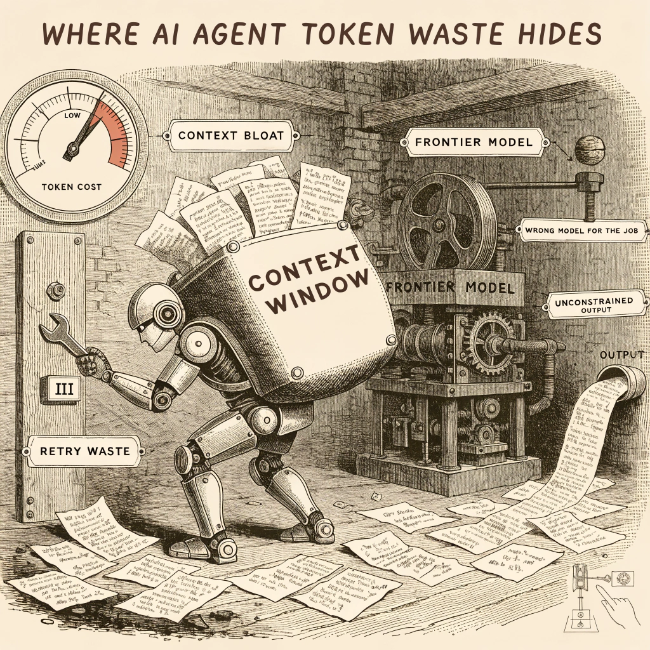
Token waste is the gap between the tokens an agent actually needed and the tokens it consumed. A session that could complete a task in 20,000 tokens sometimes uses 200,000 — not because the task required more work, but because of how context accumulates, how retries compound, and which models were chosen for which steps.
What is AI agent token waste?
Token waste is any token consumption that does not contribute to task completion. It takes several forms.
Context bloat. Every AI model has a context window — the total amount of text it can hold in its working memory at once. In a single session, this window fills up with the original task, tool results, prior conversation turns, and any documents the agent retrieved. Every piece stays in that window and gets re-read (and re-charged) on every subsequent step, even when it is no longer relevant to what the agent is doing now. When the window fills with accumulated history the agent no longer needs, that is context bloat.
Retry waste. Agents work by calling tools: actions like searching the web, running code, or writing a file. When a tool fails or returns a confusing result, the agent tries the exact same thing again rather than changing its approach. Each retry pays the full input cost of everything in the context window, plus output tokens for a new response that still does not solve the problem.
Model over-provisioning. Not every task needs the most powerful model available. Summarizing a document, formatting data, or answering a simple factual question can be handled by a cheaper model just as well. Using a top-tier frontier model for every task regardless of complexity is the AI equivalent of hiring a specialist to do work any generalist could handle. The price difference between the most and least expensive models is commonly 50–100x.
Unconstrained output. The max_tokens setting is a simple cap: it tells the model the maximum number of tokens it is allowed to generate in a single response. Without it, the model can write as much as it wants. Open-ended instructions, verbose formatting habits, and enabled reasoning features all drive responses longer than the task requires.
How do I find token waste in my agents?
Log token counts per step. Each individual model call should record input tokens, output tokens, and which model was used. Without this, you can see that a session was expensive but not which steps drove the cost.
Plot input token counts across turns in a session. A count that rises turn by turn without a corresponding increase in task complexity means the context window is filling with history that is not being cleared. That is context bloat in progress.
Look for repeated tool calls with identical arguments. The same tool appearing multiple times in a session with the same inputs is a retry loop. Each iteration consumes the full context cost again.
Check the output-to-input token ratio. For most coding and reasoning tasks, output tokens should be a fraction of input tokens. A ratio above 0.5, or one that rises over the course of a session, often signals unconstrained generation or verbose formatting that was not required by the task.
Compare per-session costs to expected task complexity. A task that takes ten steps to complete should not cost ten times more than one that takes two steps, unless the later steps require significantly more context. Tracking cost per completed task, not just cost per session, reveals efficiency problems that averages hide.
What are common mistakes to avoid?
- Using aggregate monthly billing as the only cost signal
- Not logging which model handled each step within a session
- Allowing conversation history to grow without periodic pruning
- No
max_tokensset on individual requests in agentic workflows - Treating high session costs as normal without checking whether the task required it